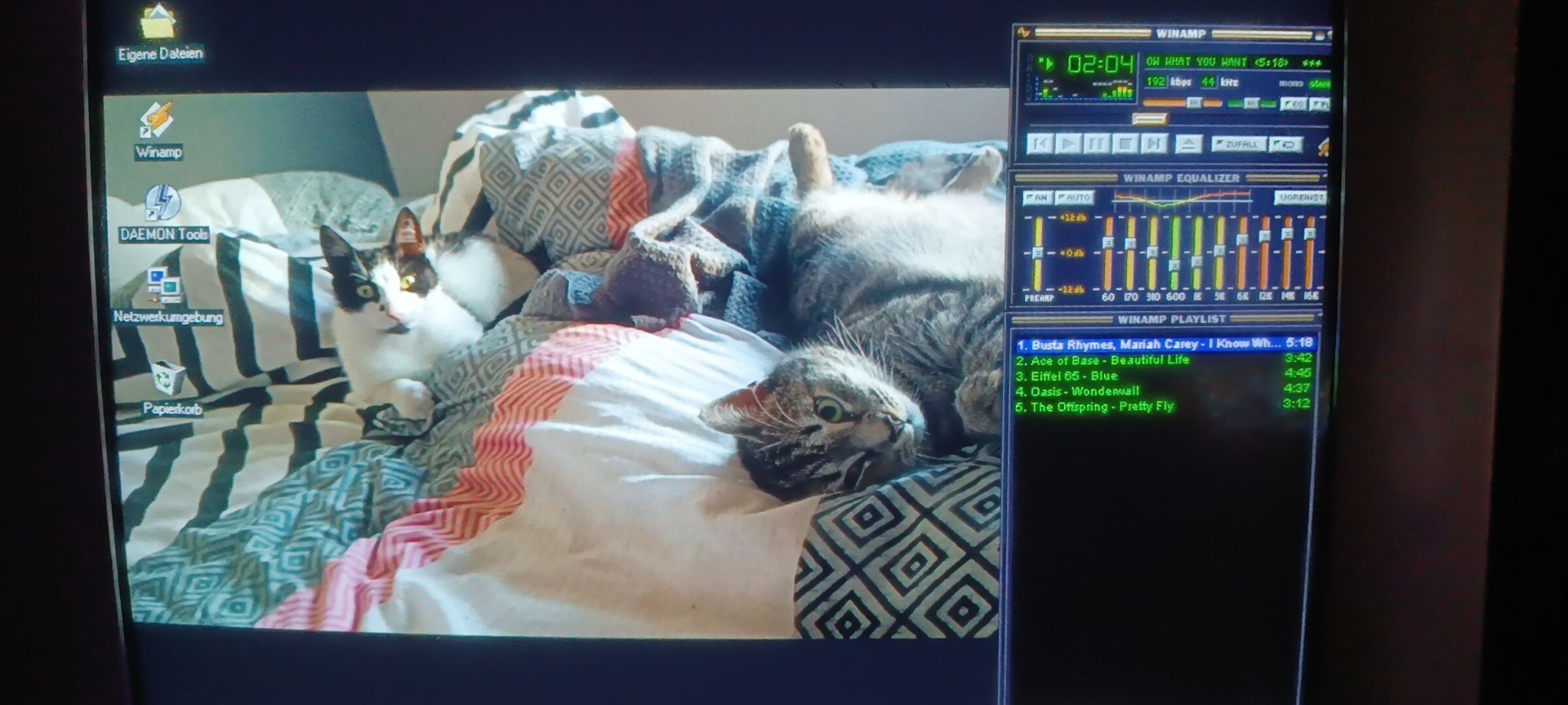
Authentic hardware, not a virtual machine
My Yakumo retro PC runs Windows 98 SE on an Intel Pentium III Katmai at 500 MHz with 128 MB of SDRAM. AIDA32 v3.94.2 identified the core hardware as TriGem NAPOLI (Intel 440BX/ZX), ATI 3D Rage Pro (8 MB), Realtek RTL8029(AS) and Aureal Vortex 1 AU8820B2. The optical drive is a Plextor PX-40TS.
My experimental Aztech sound and S3 graphics cards are removed for this test; the Iomega Zip is not connected. This restoration started with my original big box of Jane’s AH-64D Longbow (1996).
A dedicated Ethernet link to Cthulhu
A direct Ethernet cable links the Yakumo to my Arch Linux workstation's second network interface, enp81s0. The regular LAN remains on enp82s0. Windows 98 intentionally has no gateway and no DNS: it cannot reach the Internet.
| Device | Interface | Static IP |
|---|---|---|
| Arch Linux / Cthulhu | enp81s0 | 10.1.2.3/24 |
| Windows 98 / RETRO | RTL8029(AS) | 10.1.2.4/24 |
The NetworkManager connection is named retro-lan; Windows uses subnet mask 255.255.255.0. Ping worked in both directions, proving IP connectivity but not yet file-sharing compatibility.
Samba instead of FTP: SMB1 on the retro cable only
I tried vsftpd first, but FTP did not work reliably in this setup, so I removed it and installed Samba. This Windows 98 SE configuration uses old NetBIOS-based SMB; Samba is deliberately restricted to SMB1/NT1 and TCP port 139.
The actual /etc/samba/smb.conf:
[global]
workgroup = WORKGROUP
netbios name = CTHULHU
server role = standalone server
security = user
map to guest = Bad User
interfaces = lo 10.1.2.3/24
bind interfaces only = yes
hosts allow = 127. 10.1.2.4
hosts deny = ALL
server min protocol = NT1
server max protocol = NT1
smb ports = 139
load printers = no

[RetroShare]
path = /home/nebu/RetroShare
browseable = yes
guest ok = yes
guest only = yes
force user = nebu
read only = no
follow symlinks = no
The shared folder is /home/nebu/RetroShare. Windows 98 maps \\10.1.2.3\RetroShare as drive E:. Reading and copying files from Arch works. Write access is confirmed too: From Windows 98, I can create and delete files and folders inside the shared RetroShare directory on Cthulhu. This is limited to that one share, not other directories on Arch Linux.
UFW and the great Windows 98 reboot tradition
Samba was already listening on 10.1.2.3:139, yet Windows 98 could not find the share. Packet capture showed NetBIOS queries from the Yakumo. Three UFW rules limited specifically to the retro interface, peer address and relevant ports made the connection possible:
sudo ufw allow in on enp81s0 from 10.1.2.4 to 10.1.2.3 port 137 proto udp
sudo ufw allow in on enp81s0 from 10.1.2.4 to 10.1.2.3 port 138 proto udp
sudo ufw allow in on enp81s0 from 10.1.2.4 to 10.1.2.3 port 139 proto tcp
Afterward, the share worked. A subsequent Samba change temporarily broke the E: mapping; restarting Windows 98 restored it. Katharina came into the room several times that afternoon — apparently always while Windows was rebooting. 🤣
Winamp finally plays — thanks to Aureal Vortex
Berta and Bigmac got their desktop wallpaper first. Next came the Aureal Vortex Windows 9x driver 4.06.1189, selected from the AIDA32 identification. Then it happened: sound! Winamp played Busta Rhymes & Mariah Carey — I Know What You Want. Ace of Base, Eiffel 65, Oasis and The Offspring are also on the playlist. Pure millennium nostalgia.
Update: I have now launched Jane’s AH-64D Longbow too – and confirmed sound in the game! This is a real Windows 98 SE test, not a claim that every separate pure-DOS environment works.
Security: do not put SMB1 on your regular LAN
SMB1 is obsolete and insecure. This setup is an isolated vintage experiment only: dedicated cable, fixed addresses, Samba interface binding, narrowly scoped UFW rules and no Windows 98 Internet gateway. The guest share allows creating and deleting files and folders inside RetroShare, so only harmless transfer files belong there — never personal data.
This is a documented individual test, not a general recommendation to enable SMB1 on today's home networks.
Conclusion: the computer museum is connected
Arch Linux and Windows 98 SE can talk. The Yakumo reads and writes files in Cthulhu's shared folder via E:, AIDA32 has identified its actual hardware, and Winamp plays music. Berta and Bigmac are on guard, and the Quantum Fireball gets its reboots. ❤️
And the happy ending: Jane’s AH-64D Longbow runs with sound! The verified game test belongs in the Longbow restoration journal.